
go-html-asset-manager provides a simple way to optimize CSS & JavaScripts assets in your statically generated site.
Why?
Improving your sites performance can be a difficult task, balancing best practice, feature support, playform changes and legacy content.
This tool is designed to be run on generated static sites and improve the performance by adding assets that are necessary, in an efficient mannger and without risk.
This tool does the following:
- Removes all existing CSS and JS on the page
- Makes iframes async
- Add width and height attributes to iframes and images
- Generates multiple image sizes
- Generates picture element markup
- Injects the required CSS and JS for each page
- Add
lazyloadto images - Updates image for Open Graph to a suitable size
- Wraps images and iframes with divs to apply appropriate ratios to the elements
- Provides a lazy load approach for YouTube and Vimeo videos.
- Revision assets for safe caching
How?
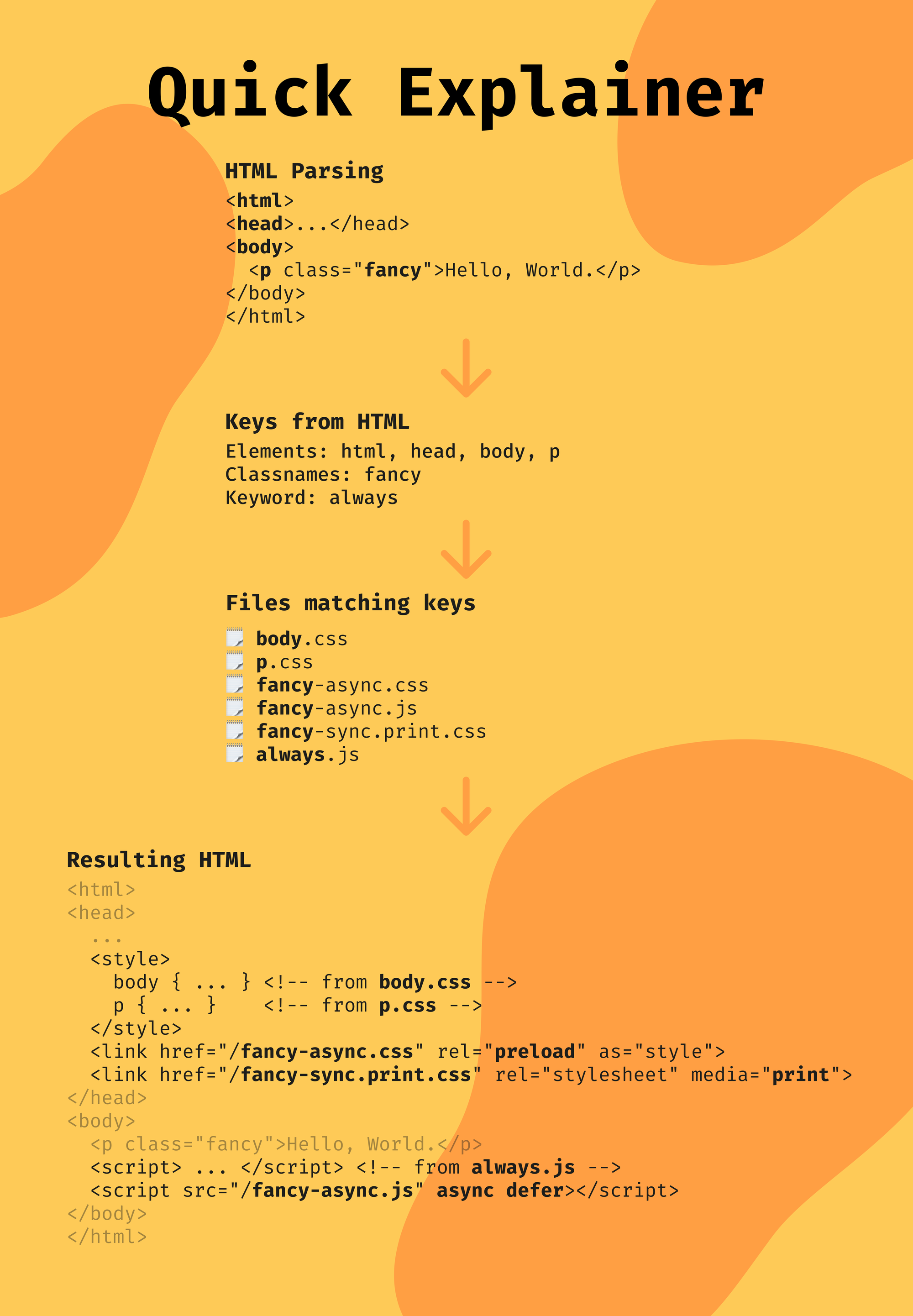
The tool takes a configuration file to describe the project and then it looks for files following a specific naming format.
<HTML Element | CSS Classname>[-<inline | sync | async | preload>][.<media>].<css | js>
This format is used by the HTML asset manager to determine which assets are need in each HTML file.
For example, a HTML page with a <h1> element would have the following assets injected into them:
h1.css: Primary CSS that you want to be inlined (If no loading strategy is defined, inline is the default)h1-async.css: For optional styles.h1-sync.print.css: Styles that are needed for print can be synchronously loaded by the browser when required.h1-async.js: To load a script that adds anchor tags to the page.
Found an Issue?
If you've found an issue, please report it here.
Want the Source Code?
This project is available on GitHub at github.com/gauntface/go-html-asset-manager.
Found an issue?
All my posts are available to edit on GitHub, any fix is greatly appreciated!